

Importing
Variables from Another Model Pluvo lets you reuse variables across different models—so you don’t need to rebuild the same logic in multiple places. You can import a variable from one model or page into another. This is helpful when multiple models rely on shared assumptions, drivers, or metrics (like headcount, revenue, or global inputs).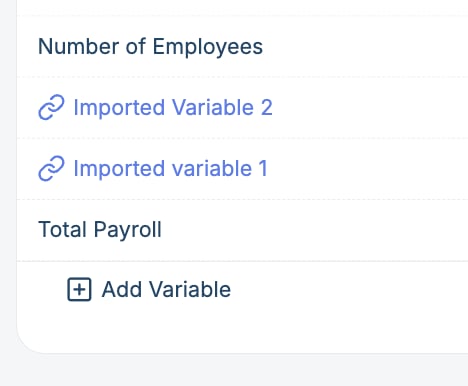
How to Import a Variable
- Scroll to the bottom of the grid
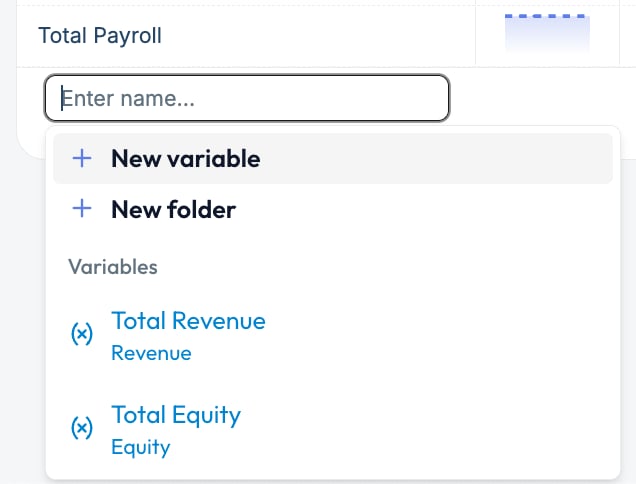
- Click the “+ Add Variable” button
- Below “New Variable” and “New Folder,” you’ll see a list of existing variables from other models/pages
- Click on any variable in that list to import it into your current model
- 🔗 Chain icon – indicates it’s imported
- Blue coloring – visually distinguishes it from locally defined variables
Working with Imported Variables
Imported variables are read-only in the current model.- You can’t edit the forecast definition, actuals mapping, or values here
- You can change the display name of imported variables, but this will only update their name in the current grid.
- To make changes, go to the model or page where the variable was originally created
- Hover over the variable name in the grid to see where it came from
Best Practices
- Use imported variables for shared inputs or centralized logic (like FX rates, headcount, shared revenue drivers)
- Name variables clearly so they’re easy to identify when importing
- Group shared variables into dedicated pages or folders for easy reuse
- If you need to modify an imported variable, make a local copy or go to its source model