> ## Documentation Index
> Fetch the complete documentation index at: https://docs.pluvo.io/llms.txt
> Use this file to discover all available pages before exploring further.
# Merging Scenarios
> Once you've built and reviewed a scenario branch, you can **merge it back into the Base Scenario**. This lets you promote an alternate plan to become your new
## Merging Scenarios
Once you've built and reviewed a scenario branch, you can **merge it back into the Base Scenario**. This lets you promote an alternate plan to become your new source of truth—without having to rebuild it manually.
Merging is a key part of Pluvo’s base/branch system: it lets you keep your planning agile while staying anchored to a single, trusted baseline.
### How to Merge a Scenario
Merging a scenario allows you to take all changes from a branch and apply them to the base scenario—perfect for locking in final decisions or approved plans.
#### To merge a scenario:
1. Click the **Scenario dropdown** at the top of the screen.
2. Find the scenario you want to merge.
3. Click the **three-dot menu** next to that scenario.
4. Select **"Merge to base."**
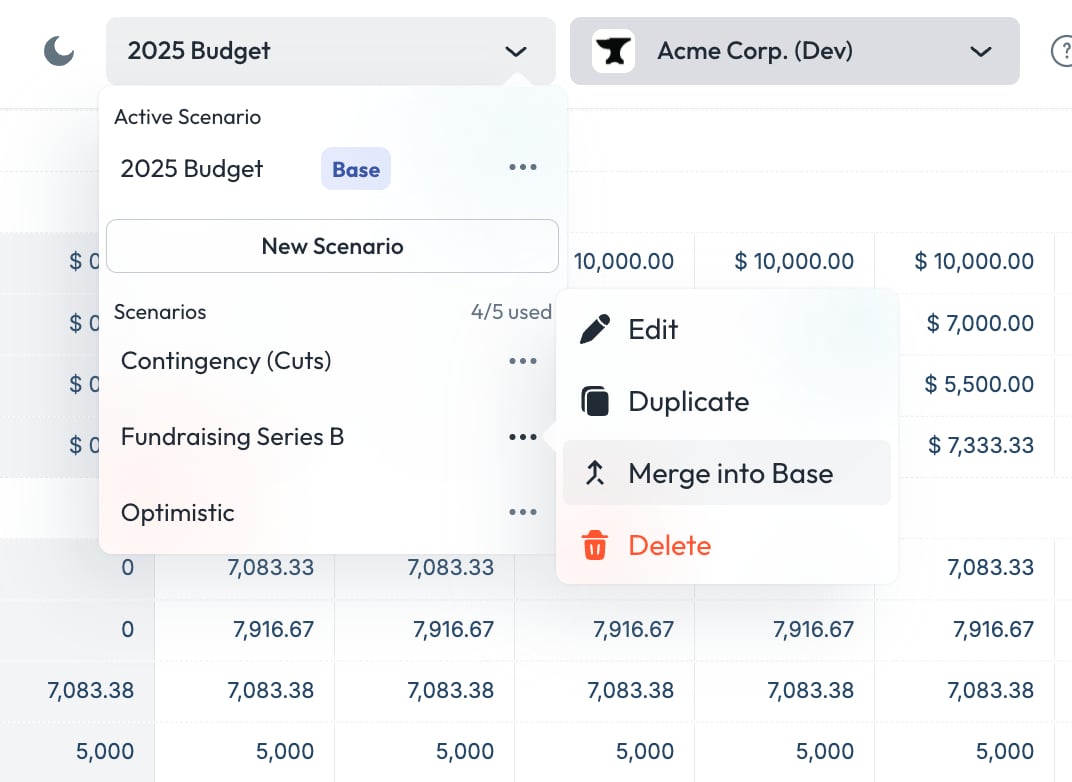 Once merged, that scenario becomes the **new base**—replacing the previous one with all its variables, logic, and data.
Use this when you’re ready to commit a forecast or proposal to your official model.
### What Happens When You Merge
When you merge a scenario (e.g. “Optimistic”) into the Base:
* The **Base Scenario is replaced** with the full definition of the scenario you're merging
* All other scenarios will immediately **inherit updated values from the new Base**, but only in areas where they are still linked
* Any variables or cells that were **de-linked** in other scenarios remain untouched
This makes merging safe and precise—only linked logic updates downstream
### Example
Let’s say your Base Scenario reflects your approved budget, and you’ve created a scenario called **“Mid-Year Reforecast.”**
In that scenario, you:
* Increase headcount
* Adjust sales growth
* Add a one-time bonus in June
You’ve made a mix of full variable edits and a few cell-level overrides. When you merge:
* All **Base logic is replaced** with the new assumptions
* Other scenarios like “Worst Case” now reflect the new Base—but only for linked variables and cells
* Any previously **de-linked cells** or **fully de-linked variables** in those scenarios stay unchanged
### What Does *Not* Happen
Merging does **not**:
* Restore links to de-linked variables or cells in other scenarios
* Create a backup of the old Base
* Affect
Chart or Dashboard layouts (those are global)
### Merge Logic Overview
\| Scenario Element | Affected by Merge? | Notes |
\| ----------------------------------- | ------------------ | ------------------------ |
\| Linked variable (unchanged) | ✅ Yes | Inherits new Base logic |
\| Fully de-linked variable | ❌ No | Retains custom logic |
\| De-linked cell | ❌ No | Cell remains independent |
\| Integration Data | ❌ No | Always shared globally |
\| Variable structure (e.g. name/type) | ❌ No | Always shared globally |
### When to Merge
Merging is useful when:
* A forecast becomes your new “official” plan
* You want to roll reforecasting assumptions into the main model
* You're cleaning up scenario sprawl and consolidating logic
### Best Practices
* **Save a copy** of the Base Scenario before merging if you want a fallback *(coming soon)*
* Communicate with your team before merging—it affects downstream logic
* Keep an eye on de-linked logic in other scenarios so you know what *won’t* update
* After merging, **audit your other scenarios** for alignment
***
Need help planning a merge or cleaning up your scenario tree? [Contact support](mailto:support@pluvo.io).
Once merged, that scenario becomes the **new base**—replacing the previous one with all its variables, logic, and data.
Use this when you’re ready to commit a forecast or proposal to your official model.
### What Happens When You Merge
When you merge a scenario (e.g. “Optimistic”) into the Base:
* The **Base Scenario is replaced** with the full definition of the scenario you're merging
* All other scenarios will immediately **inherit updated values from the new Base**, but only in areas where they are still linked
* Any variables or cells that were **de-linked** in other scenarios remain untouched
This makes merging safe and precise—only linked logic updates downstream
### Example
Let’s say your Base Scenario reflects your approved budget, and you’ve created a scenario called **“Mid-Year Reforecast.”**
In that scenario, you:
* Increase headcount
* Adjust sales growth
* Add a one-time bonus in June
You’ve made a mix of full variable edits and a few cell-level overrides. When you merge:
* All **Base logic is replaced** with the new assumptions
* Other scenarios like “Worst Case” now reflect the new Base—but only for linked variables and cells
* Any previously **de-linked cells** or **fully de-linked variables** in those scenarios stay unchanged
### What Does *Not* Happen
Merging does **not**:
* Restore links to de-linked variables or cells in other scenarios
* Create a backup of the old Base
* Affect
Chart or Dashboard layouts (those are global)
### Merge Logic Overview
\| Scenario Element | Affected by Merge? | Notes |
\| ----------------------------------- | ------------------ | ------------------------ |
\| Linked variable (unchanged) | ✅ Yes | Inherits new Base logic |
\| Fully de-linked variable | ❌ No | Retains custom logic |
\| De-linked cell | ❌ No | Cell remains independent |
\| Integration Data | ❌ No | Always shared globally |
\| Variable structure (e.g. name/type) | ❌ No | Always shared globally |
### When to Merge
Merging is useful when:
* A forecast becomes your new “official” plan
* You want to roll reforecasting assumptions into the main model
* You're cleaning up scenario sprawl and consolidating logic
### Best Practices
* **Save a copy** of the Base Scenario before merging if you want a fallback *(coming soon)*
* Communicate with your team before merging—it affects downstream logic
* Keep an eye on de-linked logic in other scenarios so you know what *won’t* update
* After merging, **audit your other scenarios** for alignment
***
Need help planning a merge or cleaning up your scenario tree? [Contact support](mailto:support@pluvo.io).